Set up the lab
In this chapter
- Open the lab in your browser, or set it up on your own computer.
- Check the setup with
sapling doctor. - Find the files of the lab: the protocol, the data, the guide.
- Time
- 10 minutes to start, a few minutes of waiting the first time
- At the end you have
- VS Code with R, Sapling SAP, DataStep Studio for R, the protocol and the SDTM data of the pilot.
You need four things: VS Code with the two extensions Sapling SAP and DataStep Studio for R, R with its packages, the protocol of the study and its SDTM data. Choose one of two ways.
| In your browser | On your computer | |
|---|---|---|
| What you install | Nothing | VS Code (or Positron), the two extensions, R 4.4, Python 3 |
| What you need | A free GitHub account | About 20 minutes |
| Best for | Reading the book and running every command | Your own studies after the book |
2.1 In your browser: nothing to install
Section titled “2.1 In your browser: nothing to install”The lab is a ready-made computer in the cloud, a GitHub codespace, with everything the book uses.
-
Open the lab: github.com/datastep-labs/protocol-to-dashboard.
-
Click Code, then Create codespace on main. Sign in to GitHub; a free account is enough.
-
VS Code opens in your browser with
START-HERE.mdand asks: Do you trust the authors of the files in this folder? The folder is the book’s lab: click Trust Folder & Continue. Without it, the terminal does not start. -
Wait about ten minutes the first time. The setup installs the R packages, a headless Chrome for the dashboard’s check, and the data. The terminal says Ready when the setup is done. Later starts of the same codespace are fast.
A free GitHub account includes a monthly amount of codespace time. Without a payment method you are never charged. Stop the codespace when you are done; it keeps your files.
2.2 On your computer
Section titled “2.2 On your computer”-
Install VS Code. From its Extensions view, install Sapling SAP and DataStep Studio for R (both by DataStep Labs).
-
Install R 4.4 and Python 3.
-
Download the lab as a ZIP from its page (Code, Download ZIP) and open the folder in VS Code.
-
In a terminal of VS Code, get the data and check the setup:
Terminal window bash tools/get-data.shsapling doctorsapling doctorlists each thing the computer needs. Each line says OK or FIX, and a FIX line shows the command that repairs it.
2.3 The files of the lab
Section titled “2.3 The files of the lab”| File | What |
|---|---|
protocol/usdm.json |
the protocol of the CDISC pilot study as CDISC USDM (from the CDISC 360i project, MIT licence) |
data/sdtm/ |
the SDTM data of the study (from the PhUSE scripts repository, MIT licence) |
START-HERE.md |
a short tour of the lab |
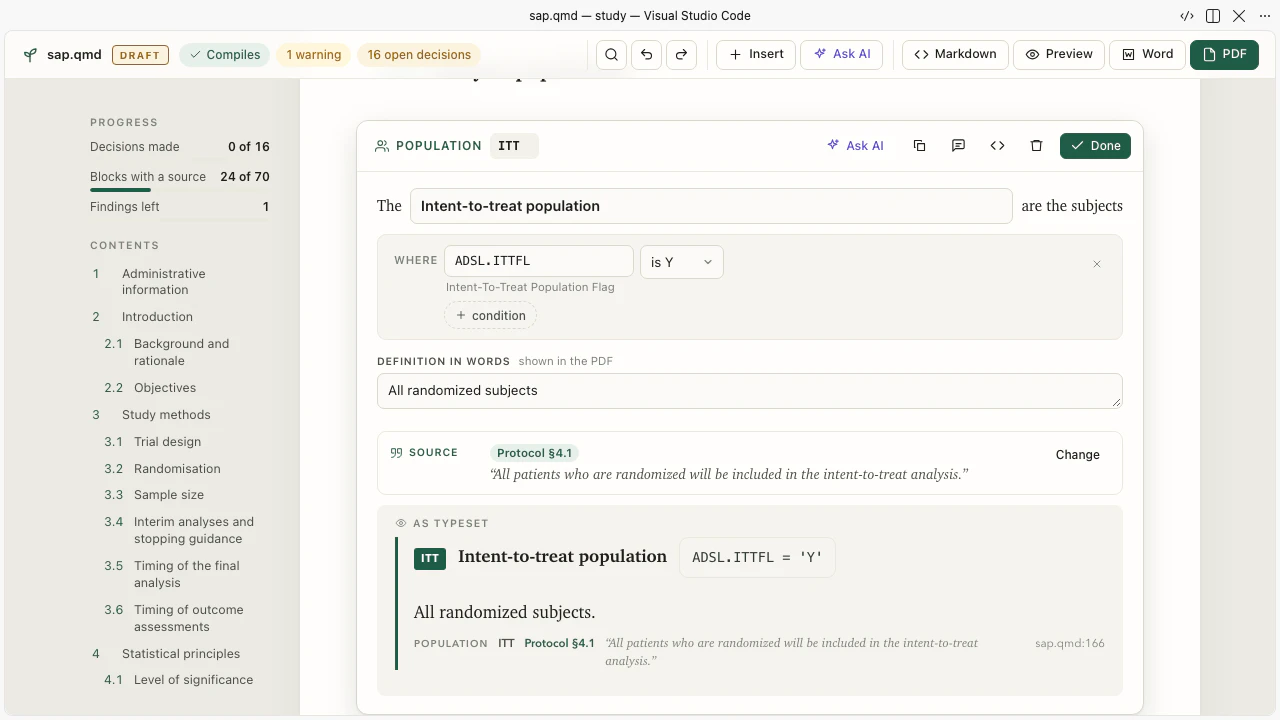
USDM (the Unified Study Definitions Model) is the protocol as data: the objectives, the endpoints, the arms, the visits, the estimands, and the text of every section. Sapling reads it, so that each block of the SAP can cite the protocol sentence it rests on.
2.4 An AI agent
Section titled “2.4 An AI agent”The lab has the Claude Code command line (claude). You sign in with your own account the first time you run it. Any
agent that reads AGENTS.md works the same way: Codex, Gemini CLI, GitHub Copilot. Chapter 6 starts one.
Every chapter also works without an agent. Then you type the agent’s commands yourself.
Your turn 2.1 Your first command
In a terminal of the lab, type sapling help. How many commands does it list for you, and where are the others?
Show the answer
It lists a short set of commands for the statistician (a study, its status, your agent, the dossier, agree and revise,
decide, approve, final, the dashboard, blind and unblind, doctor). The last line says where the others are: sapling help --all, the toolbox of agents and programmers.
$ sapling helpsapling 0.1.0: the statistical analysis plan, from the protocol to the dashboard
  sapling new <study> --protocol usdm.json --sdtm <folder>   a study: the first draft of the SAP from the protocol  sapling status                 where the study stands: the score, your readiness, the four products, what is next  sapling agent                  your AI agent in the study, working the loop of AGENTS.md (it may not decide for you)  sapling judge                  the dossier: each block to read (out/eval/judge.html)  sapling agree <block> --by NAME     |  sapling revise <block> "<what to change>" --by NAME  sapling decide [<n> "<answer>"] --by NAME                  the open decisions of the protocol  sapling approve --by NAME      the approval, when the plan is ready  sapling final --make           the SAP, the ADaM, the tables and the dashboard, made in R and judged  sapling dashboard              the study dashboard  sapling blind | unblind --by NAME   a dummy treatment before the unblinding; the real one after  sapling doctor                 what this computer needs, with the fix
  For agents and programmers: every command, each with --json: sapling help --all (docs/harness.md)
What you learned
- The lab is VS Code in your browser with everything installed; your own computer needs the two extensions and R.
sapling doctorchecks the setup and tells the fix.- The protocol comes as USDM, the data as SDTM: both public, both of the CDISC pilot.
Next: 3 · The whole path in one hour →
Found an error or have a question? Write to datastep.studio@gmail.com· The plan is written in Sapling; every R program runs in DataStep Studio for R.
Data: the CDISC pilot study (cdiscpilot01). The protocol as CDISC USDM from the CDISC 360i project (MIT licence); the SDTM data from the PhUSE scripts repository (MIT licence). Public example data: no real patient.
R is a project of the R Foundation. SAS is a registered trademark of SAS Institute Inc. CDISC, SDTM, ADaM and USDM are trademarks of the Clinical Data Interchange Standards Consortium. Claude is a trademark of Anthropic. This book is not affiliated with or endorsed by any of them.
© 2026 DataStep Labs. All rights reserved.